Business Bill Management
Missed payments damage vendor relationships and distort your financials. AccuArk© Bill Management gives you complete control over what you owe, when it is due, and how it gets paid. Track every bill from creation through payment, record partial and split payments across accounts, and automate recurring expenses like rent and utilities. AP aging reports and overdue alerts ensure nothing slips through the cracks, while vendor profiles keep all your supplier information in one place.
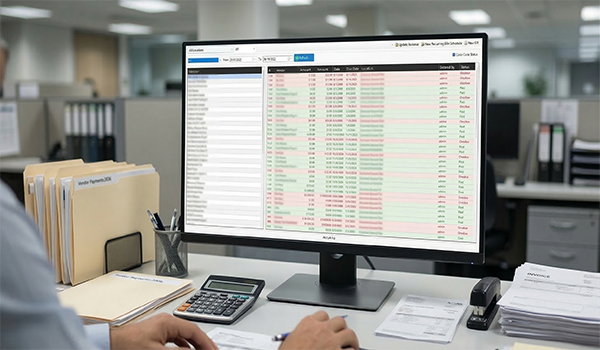
Bill Creation & Payment Tracking
Create bills from any vendor, set due dates, record payments, and track balances in real time. AccuArk© automatically flags overdue bills and color-codes statuses so you can see at a glance what needs attention. Filter by vendor, date range, status, or location to find exactly what you need.
Bill Creation & Editing
Create new bills with vendor, amount, due date, reference, and notes
Bill Status Tracking
Track statuses including New, Unpaid, Overdue, Paid, Partially Paid, and Canceled
Status Color Coding
Color-coded rows highlight overdue, paid, and new bills at a glance
Payment Recording
Record payments against bills and track remaining balances automatically
Split Payments Across Accounts
Distribute a single payment across multiple financial accounts
Bill Cancellation
Cancel bills that are no longer valid with full status tracking
Bill Printing
Print bill details for records, approvals, or vendor communication
Role-Based Permissions
Control who can create, edit, pay, and cancel bills with permissions
Vendor Management
Maintain a complete directory of your vendors and suppliers with contact details, payment information, and outstanding balances. Filter vendors alphabetically, spot inactive accounts at a glance, and open any vendor profile to view their full billing history.
Vendor Profiles
Complete profiles with company name, contact person, phone, email, and address
Outstanding Balances
See what you owe each vendor at a glance from the vendor list
Alphabetical Browsing
Filter vendors by first letter with the A-Z bar for quick lookup
Active & Inactive Status
Disabled vendor accounts are highlighted in red for easy identification
Vendor Credits & Refunds
Track vendor credits and apply them to future bills automatically
Website & Communication
Store vendor websites, fax numbers, and email for quick communication
Recurring Bills & Purchase Orders
Automate your regular expenses and link bills to purchase orders for end-to-end traceability. Set up recurring schedules for monthly rent, utilities, and subscription charges so they are created automatically without manual entry.
Recurring Bill Schedules
Set it and forget it. Configure recurring bill schedules for predictable monthly expenses.
- Define frequency, amount, vendor, and start date
- Bills are generated automatically on schedule
- Covers rent, utilities, subscriptions, and insurance
- Edit or cancel schedules at any time
Purchase Order Integration
Link bills directly to purchase orders for complete procurement tracking.
- Match vendor bills to the PO that generated them
- Verify amounts against original purchase order totals
- Track the full lifecycle from order to payment
- Reduce duplicate bill entries with PO references
Multi-Location Bill Tracking
Track bills per location with consolidated views across your business.
- Assign each bill to a specific business location
- Filter the bill list by location for branch-level views
- Location-specific AP aging and spending reports
- Consolidated views when you need the full picture
Bill Reporting & AP Aging
Know exactly where your money goes with AP aging reports, vendor spend analysis, and payment history. Filter by date range, status, or vendor to find the information you need and make better financial decisions.
AP Aging Report
View outstanding payables by aging period: current, 30, 60, and 90+ days
Vendor Spend Analysis
Analyze spending patterns by vendor to identify cost-saving opportunities
Payment History
View full payment history for any bill with amounts, dates, and methods
Advanced Filtering
Filter bills by vendor, date range, status, and location simultaneously
What Sets AccuArk© Bill Management Apart
These are the features that make AccuArk© Bill Management more than a simple bill list — capabilities that give you real control over your accounts payable.
Flexible Payment Recording
Pay bills on your terms with partial and split payment support.
- Record partial payments and track remaining balances
- Split payments across multiple financial accounts
- Bill summary shows total payments, credits, and balance
- Payment history recorded on every bill for full traceability
Overdue Detection & Alerts
Never miss a payment deadline with automatic overdue tracking.
- Bills past due date are automatically flagged as overdue
- Countdown shows "Due in 3 days" or "Due today" warnings
- Color-coded status rows highlight urgent bills
- Bulk status update recalculates all bill statuses at once
Accounting Integrity
Once a bill is linked to financial transactions, key fields are protected.
- Posted bills lock vendor, amount, date, and location fields
- Lock icon indicates protected fields to prevent accidental edits
- Returns reduce bill totals without altering original amounts
- Canceled bills cannot receive new payments
Complete Vendor Management
Every vendor relationship in one place with full context.
- Store contact names, phone, email, fax, and website
- Track outstanding balance per vendor in real time
- Filter bills by vendor to see all their invoices at once
- Enable or disable vendor accounts as relationships change
Know Your True Profit
Revenue without expense tracking is just guessing. AccuArk© Bill Management connects your vendor bills, payments, purchase orders, and accounting ledger in one system — so every dollar you spend is tracked, categorized, and reflected in your financial statements automatically.
Why Bill Management Matters
Your vendor relationships and cash flow depend on how well you manage your payables. A disciplined AP process protects your bottom line.
Cash Flow Control
Know exactly what you owe and when. AP aging reports and due date tracking let you plan payments strategically and avoid cash shortfalls that disrupt operations.
Vendor Relationships
Paying on time builds trust with your suppliers. Overdue alerts and recurring bill automation ensure you never miss a payment that could damage a key vendor relationship.
Never Miss a Payment
Automatic overdue flagging, countdown warnings, and recurring schedules work together to make sure every bill is accounted for and paid when it should be.
Explore More Modules
AccuArk© modules work together seamlessly to run your entire business.
Choose Your Plan & Start Your Free Trial
Every plan includes all features. No feature walls, no hidden fees. Cancel anytime.
Perfect for solo entrepreneurs and single-register shops
- All Features Included
- Free Updates Forever
Three machines for your growing single-location business
- All Features Included
- Free Updates Forever
Two locations with 3 machines each — your first multi-site step
- All Features Included
- Free Updates Forever
Best value for growing chains — 20 locations
- All Features Included
- Free Updates Forever