Point of Sale System
Long checkout lines cost you sales. AccuArk© POS is built for speed, reliability, and ease of use — even during your busiest hours. Scan barcodes, search products, apply discounts, hold invoices, split payments, and process returns all from one screen. Multi-terminal support with real-time inventory sync across every location.
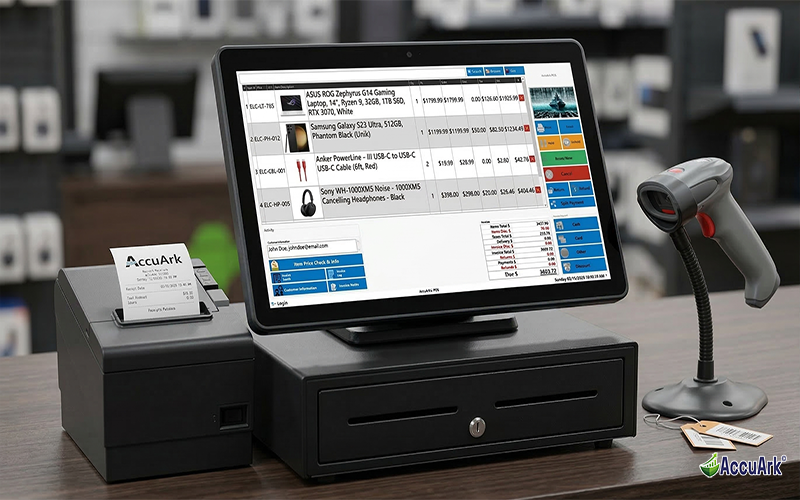
Fast Checkout Experience
Ring up sales quickly with barcode scanning, product search, and customizable quick-action buttons. AccuArk© POS handles high-volume retail with ease — whether you're processing ten transactions an hour or a hundred.
Fast Barcode Scanning
Scan any product barcode to instantly add it to the invoice
Product Search & Lookup
Find items by name, SKU, or item number in seconds
Customer Lookup at Register
Assign a customer to the sale for loyalty, pricing, and history
Purchase History Access
View a customer's past purchases right from the register
Compact & Full POS Modes
Full desktop layout or touch-optimized compact mode for tablets
Customer-Facing Display
Show customers their items, totals, and promos on a second screen
Professional Receipt Printing
Print or email receipts automatically after every transaction
Hardware Scanner Testing
Built-in tool to verify barcode scanner connectivity and accuracy
Find Items Your Way
Every cashier works differently. AccuArk© gives your team multiple ways to add items to a sale — scan a barcode, type a search, browse by category, or check a price before committing. No training manual needed.
Barcode Scanning
Scan any barcode and the item is instantly added to the invoice
Product Search
Search by name, SKU, or item number to find any product fast
Browse by Category
Browse your full inventory organized by department and category
Price Check & Info
Look up pricing and stock details without adding to the invoice
Discounts & Flexible Pricing
Apply the right discount at the right level. AccuArk© POS supports item-level and invoice-level discounts, automatic promotional pricing, coupon redemption, and stacking rules — so your cashiers never have to guess.
Item-Level Discounts
Apply percentage or dollar discounts to individual line items
Invoice-Level Discounts
Discount the entire invoice total with a single adjustment
Promotional Pricing
Active promotions apply automatically when qualifying items are scanned
Coupon Redemption
Scan or enter coupon codes at checkout for instant savings
Stacking Rules & Caps
Control which discounts combine and set caps to protect margins
Invoice Operations
Real retail isn't always straightforward. Customers forget items, change their minds, or need special handling. AccuArk© POS gives you the tools to handle every scenario without losing your place or slowing down the line.
Hold & Resume Invoices
Customer needs to grab one more item? Put the invoice on hold and serve the next customer. Resume any held invoice when they return — all items, discounts, and customer info stay intact.
Cancel & Void
Void a sale before or after payment. Cancelled invoices are logged with the user and timestamp for complete audit trail visibility.
Invoice Notes
Add internal notes to any transaction — special requests, delivery instructions, or issue details that your team needs to see later.
Invoice History & Log
View the complete history of changes to any invoice — who modified it, when, and what changed. Full traceability on every transaction.
Serial Number Tracking
Scan and record serial numbers at checkout for warranty tracking, return verification, and product traceability.
Invoice Search & Lookup
Find any past transaction by invoice number, date, customer, or item. Handle inquiries and reprints without leaving the POS screen.
Flexible Payment Processing
Accept any payment method your customers prefer — cash, credit, debit, check, bank transfer, gift cards, or store credit. Split a single transaction across multiple methods when customers need flexibility. Every payment is recorded with confirmation details for accurate reconciliation.
Multi-Payment Methods
Accept cash, card, check, bank transfer, online payments, and more
Split Payments
Divide a single invoice across multiple payment methods in one transaction
Gift Cards & Store Credit
Issue, redeem, and track gift card and store credit balances at checkout
Tip & Gratuity Management
Configurable tip prompts let customers add gratuity at checkout
Change Calculation
Automatic change-due calculation displayed on screen and customer display
Payment Confirmation
Each payment records method, amount, and confirmation for reconciliation
Returns, Refunds & Exchanges
Handle returns the right way. AccuArk© POS lets you process returns against the original invoice, distribute refunds across the original payment methods, and track every return with reasons and audit trails for loss prevention.
Process Returns
Return items against the original invoice with quantity and reason tracking
Refund Distribution
Refunds distribute proportionally across the original payment methods
Exchange Items
Swap returned items for replacements in a single transaction
Refund Audit Trail
Every return and refund is logged with user, timestamp, and reason
Shift & Cash Management
Complete control over cash drawers, employee shifts, and end-of-day reconciliation. Every shift starts with a deposit and ends with a full cash count and withdrawal — so your books balance and your team stays accountable.
Employee Check-In/Out
Employees clock in and out of POS shifts with tracked timestamps and shift summaries.
Cash Count & Reconciliation
Count the cash drawer at shift end and reconcile expected vs. actual amounts.
Safe Drops
Record safe drop transactions to keep cash drawer amounts manageable during busy shifts.
Multi-Terminal Support
Run multiple POS machines per location, each with its own cash drawer and shift tracking.
Receipt Reprinting
Look up and reprint any past receipt from the receipt preview screen.
Refund Tracking
Track refund reasons and distributions with full audit trail for loss prevention.
Hardware & Customer Display
AccuArk© POS works with the hardware you already have. Plug in barcode scanners, receipt printers, and cash drawers — then use the built-in tools to verify everything is connected and working before you go live.
Receipt Printer
Print professional receipts automatically, or reprint any past receipt on demand
Barcode Scanner
USB or wireless scanners work instantly — test connectivity with the built-in tool
Cash Drawer
Open the drawer manually or automatically after cash transactions
Customer-Facing Display
Show items, totals, and promotions on a second screen facing the customer
What Sets AccuArk© POS Apart
These are the features that make AccuArk© POS more than just a cash register — capabilities that save time, reduce errors, and keep your customers happy.
Hold & Resume Invoices
Keep the line moving when customers aren't ready to pay.
- Put any in-progress sale on hold with one click
- Serve the next customer while the held invoice waits
- Resume with all items, discounts, and customer info intact
- Track all held invoices from the unhold screen
Split Payments Made Simple
Customers pay however they want — even across multiple methods.
- Split a single invoice across cash, card, check, and more
- Each payment method records its own amount and confirmation
- Remaining balance updates in real time as payments are applied
- Full split payment history on every receipt
Customer-Facing Display
Give your customers full transparency at the register.
- Customers see their items, prices, and running total in real time
- Promotional slideshows play during idle time between transactions
- Custom welcome messages and store branding on display
- Automatic change-due display after payment
Standard & Compact POS Modes
One POS system, two interface modes — choose what fits your hardware.
- Standard mode: full-featured layout for desktop monitors
- Compact mode: touch-optimized for smaller screens and tablets
- Both modes share the same features and transaction data
- Switch modes per machine based on your hardware setup
More Than a Cash Register
Most POS systems stop at scanning and payments. AccuArk© goes further — hold invoices, split payments across methods, apply item and invoice-level discounts, process returns against original transactions, and track serial numbers — all from a single screen. Your cashiers get the tools they need to handle real retail scenarios without workarounds or manual fixes.
Why a Great POS Matters
Your point of sale is where revenue happens. A fast, accurate, and flexible POS system directly impacts your bottom line.
Faster Checkout
Every second at the register counts. Barcode scanning, quick search, and one-click payments mean shorter lines and more sales per hour.
Fewer Errors
Automated pricing, tax calculation, and refund tracking eliminate manual mistakes. Every transaction is accurate and auditable.
Happy Customers
Customer-facing displays, flexible payment options, and fast returns create a checkout experience that brings customers back.
Explore More Modules
AccuArk© modules work together seamlessly to run your entire business.
Choose Your Plan & Start Your Free Trial
Every plan includes all features. No feature walls, no hidden fees. Cancel anytime.
Perfect for solo entrepreneurs and single-register shops
- All Features Included
- Free Updates Forever
Three machines for your growing single-location business
- All Features Included
- Free Updates Forever
Two locations with 3 machines each — your first multi-site step
- All Features Included
- Free Updates Forever
Best value for growing chains — 20 locations
- All Features Included
- Free Updates Forever