Dashboards
Running a business without real-time visibility means making decisions in the dark. AccuArk© provides dedicated dashboards for every area of your operations -- sales, financials, inventory, assets, CRM, payroll, and team performance -- all updating in real time. Each dashboard surfaces the metrics that matter most, from today's sales totals and overdue bills to low-stock alerts and team workloads. Filter by location for branch-level views or see the consolidated picture across your entire business.
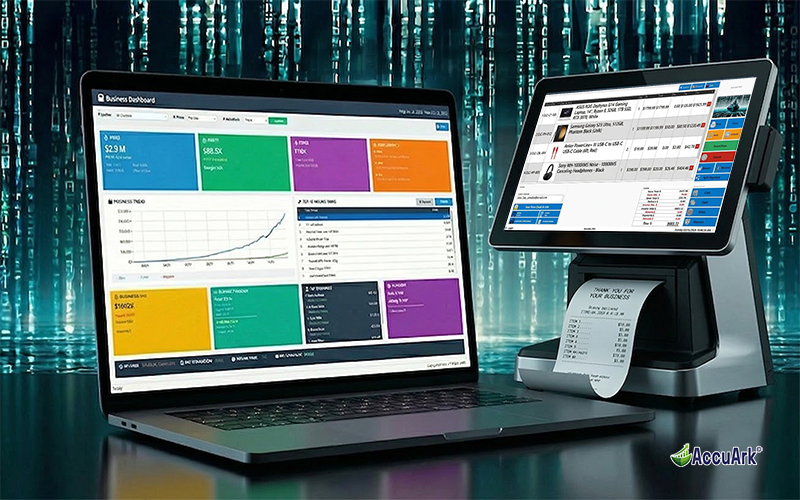
Main & Extended Dashboards
Your command center. The main dashboard surfaces key metrics from sales, inventory, customers, and finances in easy-to-read cards. The extended sales transactions view provides a searchable, sortable grid of every invoice with summary totals, status filtering, and quick access to create or open any transaction.
Today's Sales Metrics
Total sales, transaction count, and average value for today with week-over-week comparison
Inventory Alerts
Low-stock and out-of-stock items highlighted so you can reorder before running out
Customer Activity
New customers, returning customers, and loyalty activity tracked in real time
Revenue Summary
Revenue totals for current week, month, and year with comparison to previous periods
Accounts Receivable
Outstanding customer balances and overdue invoices that need collection attention
Accounts Payable
Upcoming bill payments and overdue amounts owed to vendors at a glance
Top Products
Best-selling products for the current period ranked by quantity sold or revenue generated
Employee Performance
Sales performance by employee including total sales amount and transaction counts
A Dashboard for Every Area
Each department and function has its own dedicated dashboard with the metrics that matter most. From financial health and asset management to CRM pipeline and team workload, every dashboard gives you actionable insights without running individual reports.
Financial Dashboard
Six key panels covering cash position, accounts payable, accounts receivable, profit and loss summary, recent financial transactions, and bill alerts with overdue and due-this-week counts.
Asset Dashboard
Overview of your fixed assets -- total value, depreciation status, maintenance due dates, checked-out items, and disposal history for complete asset lifecycle visibility.
CRM Dashboard
Sales pipeline overview showing active deals, stage distribution, conversion rates, and upcoming tasks and activities to keep your sales team on track.
Salary Dashboard
Payroll overview with salary summaries, pending payroll runs, deductions, and compensation analytics across your team for informed workforce budgeting.
Reorder Dashboard
Items below their reorder point with one-click purchase order generation and inter-location transfer suggestions to redistribute excess stock across branches.
Team Dashboard
Team performance metrics including active jobs, scheduled work, team member availability, and job progress tracking across your entire workforce.
Estimates Dashboard
Estimates pipeline tracking with pending quotes, conversion rates, expiring estimates, follow-up dates, and quote-to-invoice conversion monitoring.
Sales Transactions
Searchable, sortable grid of every invoice with summary totals, status and group filtering, column toggles, and quick access to create or open transactions.
Getting Started Onboarding
Guided onboarding dashboard that walks new users through initial setup steps, business configuration, and key features to get productive fast.
Financial Dashboard in Detail
The Financial Dashboard gives you a daily snapshot of your business's financial health in a single screen. Six panels cover every angle of your finances -- from available cash to overdue bills -- so you start each day knowing exactly where you stand.
Cash Position
Current cash balance across all cash-type accounts showing how much liquid cash is available right now
AP Summary
Outstanding, overdue, and due-this-week totals for all vendor bills in one panel
AR Summary
Outstanding, overdue, and due-this-week totals for all customer invoices at a glance
Profit & Loss
Revenue, expenses, and net income for the current accounting period in a high-level summary
Recent Transactions
Latest financial transactions with transaction number, date, description, and debit/credit amounts
Bill Alerts
Counts of overdue bills, bills due today, and bills due this week so nothing slips through
Reorder & Team Dashboards
Keep your inventory stocked and your teams productive with dashboards purpose-built for operations. The reorder dashboard prevents stockouts by flagging items below their reorder point, while the team dashboard gives managers visibility into workload and job progress.
Low Stock Alerts
Items below their configured reorder point flagged automatically with current stock and reorder quantity
One-Click PO Generation
Select low-stock items and generate purchase orders grouped by default vendor directly from the dashboard
Transfer Suggestions
Suggest inter-location stock transfers from branches with excess inventory to those running low
Active Jobs Overview
Team workload with active jobs, scheduled work dates, and current assignment status
Team Availability
See which team members are available, scheduled, or on active jobs at any given time
Job Progress
Track completion percentages and progress updates across all active jobs and team assignments
What Sets AccuArk© Dashboards Apart
These are the capabilities that make AccuArk© Dashboards more than simple charts -- features that turn data into action and keep every department informed.
Multi-Location Intelligence
Every dashboard supports location-level filtering for branch managers and consolidated views for owners.
- Filter any dashboard by specific business location
- See consolidated totals across all locations at once
- Compare performance between branches side by side
- Location-specific alerts and reorder points respected
Financial Health at a Glance
Six panels covering every angle of your financial position, updated in real time.
- Cash position shows available liquid cash across all accounts
- AP and AR summaries with outstanding, overdue, and due-this-week
- Period-to-date profit and loss with revenue, expenses, and net income
- Bill alerts flag overdue, due today, and due this week counts
Proactive Reorder Management
Stop stockouts before they happen with automated alerts and one-click purchasing.
- Items below reorder point flagged automatically by location
- Generate purchase orders directly from reorder alerts
- POs grouped by default vendor for efficient ordering
- Transfer suggestions redistribute excess stock between locations
Estimates Pipeline Tracking
Never lose a deal by tracking every quote from creation to conversion.
- Pending quotes with follow-up dates visible at a glance
- Track quote-to-invoice conversion rates over time
- Expiring estimates highlighted for timely follow-up
- Open any estimate directly from the dashboard to review or convert
Every Department, One Platform
Most business tools give you a single dashboard. AccuArk© gives you nine specialized dashboards covering sales, financials, inventory, assets, CRM, payroll, teams, estimates, and operations -- each designed for the people who need that data most. No more switching between apps to get the full picture.
Why Dashboards Matter
The difference between reacting to problems and preventing them is visibility. Real-time dashboards give every team member the information they need to make better decisions.
Instant Awareness
Start every day knowing your sales totals, cash position, overdue bills, and low-stock items. No reports to run, no spreadsheets to open -- the dashboard shows you everything in seconds.
Faster Decisions
When every metric is visible and current, decisions happen faster. Spot a cash flow issue before it becomes a crisis. Reorder inventory before a stockout costs you a sale.
Team Accountability
Employee performance, team workloads, and job progress are visible to managers in real time. Everyone knows where they stand and what needs attention next.
Explore More Modules
AccuArk© modules work together seamlessly to run your entire business.
Choose Your Plan & Start Your Free Trial
Every plan includes all features. No feature walls, no hidden fees. Cancel anytime.
Perfect for solo entrepreneurs and single-register shops
- All Features Included
- Free Updates Forever
Three machines for your growing single-location business
- All Features Included
- Free Updates Forever
Two locations with 3 machines each — your first multi-site step
- All Features Included
- Free Updates Forever
Best value for growing chains — 20 locations
- All Features Included
- Free Updates Forever