Tools & Printing
Printing barcodes, labels, checks, and cards shouldn't require separate software or expensive third-party subscriptions. AccuArk© includes a complete suite of printing and productivity tools built directly into your business manager. Print barcode labels in multiple formats, design price tags with sale pricing, generate employee ID and loyalty cards with photos and barcodes, print checks with MICR encoding, and address envelopes — all with reusable templates, configurable layouts, and live previews. Test your promotional pricing rules before they go live to avoid surprises at checkout.
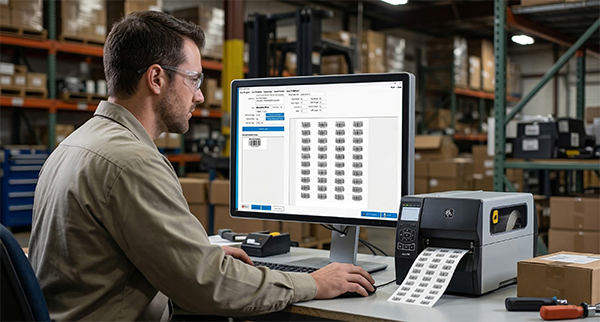
Barcode Printer & Label Maker
Design and print barcode labels in multiple symbologies with full layout control. The label maker supports shipping, product, address, and custom label types with barcode embedding, batch quantity printing, and configurable page layouts for any paper size.
Multiple Barcode Formats
Print barcodes in UPC-A, EAN-13, Code 128, QR Code, and other standard symbologies
Grid Page Layout
Arrange labels in rows and columns with custom margins and spacing for any paper size
Shipping Labels
Create shipping labels with sender and recipient addresses and embedded tracking barcodes
Product Labels
Print product labels with name, SKU, barcode, price, and description in batch quantities
Custom Text & Fonts
Choose fonts, sizes, colors, alignment, and bold or italic styling for all label text
Colors & Backgrounds
Set font color and background color for barcode labels with a color picker
Label & Page Preview
See both the individual label and full-page layout before printing with zoom controls
Export & Clipboard
Export label images to file or copy to clipboard for use in other applications
Price Tag Printer
Generate professional price tags with product details, barcodes, and pricing — ready for shelf display or product attachment. Support for regular and sale prices, customizable tag dimensions, border styles, and batch printing with multiple tags per page.
Product Details on Tags
Print product name, SKU, barcode, price, sale price, description, and unit of measure
Sale Price Display
Show both regular and sale prices on the tag with the sale price highlighted
Custom Tag Dimensions
Set tag width, height, per-row and per-column counts, gaps, margins, and border styles
Toggle Tag Elements
Show or hide barcode, SKU, sale price, and description on each tag independently
Per-Element Font Sizes
Set independent font sizes for product name, price, SKU, and barcode text
Batch Tag Printing
Set the quantity of tags per product and print multiple tags per page automatically
Check Printer & Envelope Printer
Print business checks with payee and payer details, MICR line encoding for bank processing, and auto-incrementing check numbers. Print addressed envelopes with recipient and return addresses for professional business correspondence. Both tools support preset layouts, custom dimensions, and reusable templates.
Check Printer
Print business checks with payee name, amount, written amount (auto-filled), date, memo, and check number. Supports routing and account numbers for MICR line printing and pre-printed check stock.
Auto-Increment Check Numbers
Set a starting check number and enable auto-increment to automatically advance the number for each check printed, keeping your check register in order.
Envelope Printer
Print addressed envelopes with recipient and return address information. Load your company details automatically, choose preset envelope sizes, and toggle optional date printing.
Load Company Info
Both check and envelope printers can auto-fill your company name, address, and details from your business profile with one click.
Configurable Layouts
Use preset layouts or manually set dimensions, margins, font sizes, and field positions. Fine-tune zone offsets for exact placement on any paper stock.
Pre-Printed Check Stock
Enable pre-printed stock mode to skip printing the check border and background, printing only the variable data on your existing check paper.
Card Printer & Paystub Printer
Design and print professional cards and employee pay stubs directly from AccuArk©. The card printer supports employee ID, customer loyalty, gift cards, and custom cards with photos and barcodes. The paystub printer handles earnings, deductions, benefits, and year-to-date totals.
Employee ID Cards
Create employee ID cards with name, photo, department, position, barcode, and company branding. Customize colors, fonts, and layout to match your brand.
Gift & Loyalty Cards
Print gift cards and customer loyalty cards with card value, member number, barcode for scanning at the register, and custom back-side text for terms and contact info.
Front & Back Printing
Design both sides of any card. Toggle between front and back previews, add back-side text lines and barcodes, and print double-sided cards.
Paystub Printer
Generate pay stubs with employee name, ID, department, pay period, hours, rates, gross pay, net pay, deduction line items, and benefit line items.
Year-to-Date Totals
Toggle year-to-date totals on pay stubs to show cumulative earnings, deductions, and net pay for the calendar year alongside current-period figures.
Multiple Stubs Per Page
Configure how many pay stubs print per page, set stub dimensions, and adjust spacing and margins for efficient use of paper.
Promotional Pricing Tester
Test and preview how promotional pricing rules affect item prices before you apply them in a live environment. Enter an item price and quantity, choose a promotion type, and instantly see the calculated total price, total discount, and final discounted price with a step-by-step breakdown of the calculation logic.
Special Price Testing
Test fixed promotional prices that replace the regular item price entirely
Discount Amount Testing
Preview a fixed dollar amount subtracted from the regular price of each qualifying item
Percentage Discount Testing
See the effect of a percentage reduction on item prices before going live
Bundle Deal Testing
Test bundle pricing with quantity ranges like "3 for $10" with multi-apply support
Templates, Permissions & Export
Every printing tool in AccuArk© supports reusable templates, role-based access control, and output export. Save your label, card, check, and envelope designs as templates for instant reuse. Control which employees can access each tool, and export or copy output for use in other applications.
Template Management
Save, load, edit, and reuse print templates across all tools for consistent output
Role-Based Tool Permissions
Control access to each printing tool by employee role to prevent unauthorized use
Export & Clipboard Support
Export label images and print previews to file, or copy to clipboard for pasting elsewhere
Layout Presets
Start with predefined layouts for standard paper, envelope, card, and label sizes
Print Preview with Zoom
Preview full-page output with zoom in, zoom out, and reset controls before printing
Fine-Tune Positioning
Adjust zone offsets for exact field placement on checks, cards, and envelopes
What Sets AccuArk© Tools & Printing Apart
These are the capabilities that make AccuArk© printing tools more than basic print utilities — integrated business tools that save time and eliminate the need for separate software.
Complete Barcode Printing
Print barcodes in any format your business needs.
- Support for UPC-A, EAN-13, Code 128, QR Code, and more
- Embed barcode tags in custom label text for flexible designs
- Grid layout with configurable rows, columns, and margins
- Export barcode images or copy to clipboard for other uses
Professional Card Printing
Design and print cards for every business need.
- Employee ID, loyalty, gift card, and custom card types
- Photos, barcodes, front and back text with full layout control
- Preset card layouts or custom dimensions and positioning
- Custom colors for background, accent, title, and body text
Business Check Printing
Print checks without third-party check printing software.
- Payee, amount, written amount, date, memo, and check number
- MICR line encoding with routing and account numbers
- Auto-increment check numbers for sequential printing
- Pre-printed stock mode skips borders and backgrounds
Promotional Pricing Sandbox
Verify pricing rules before they reach the register.
- Test special prices, discount amounts, and percentage discounts
- Preview bundle pricing with quantity range calculations
- Step-by-step breakdown explains exactly how the price is calculated
- No changes applied to live promotions — purely a testing tool
Every Print Job, One Application
Most businesses buy separate software for barcodes, labels, checks, and cards. AccuArk© includes all of these tools built in — barcode labels, price tags, shipping labels, business checks, addressed envelopes, pay stubs, and ID cards — with reusable templates and live previews. No extra subscriptions, no extra installations.
Why Built-In Tools Matter
The printing and utility tools your business uses every day should be part of your business system, not scattered across separate applications.
Eliminate Extra Software
Stop paying for separate barcode, label, check, and card printing subscriptions. AccuArk© includes all of these tools at no additional cost, reducing your software overhead.
Faster Workflows
Print barcodes, price tags, and labels from the same system that manages your inventory and products. No exporting, no switching applications, no re-entering data.
Consistent & Controlled
Reusable templates ensure consistent output across all locations. Role-based permissions control who can access sensitive tools like check printing and paystub generation.
Explore More Modules
AccuArk© modules work together seamlessly to run your entire business.
Choose Your Plan & Start Your Free Trial
Every plan includes all features. No feature walls, no hidden fees. Cancel anytime.
Perfect for solo entrepreneurs and single-register shops
- All Features Included
- Free Updates Forever
Three machines for your growing single-location business
- All Features Included
- Free Updates Forever
Two locations with 3 machines each — your first multi-site step
- All Features Included
- Free Updates Forever
Best value for growing chains — 20 locations
- All Features Included
- Free Updates Forever