Digital Signage & Slideshow
Static posters and handwritten signs can't keep up with your promotions. AccuArk© Digital Signage turns every in-store screen into a dynamic, data-driven display. Build slideshows with live data binding so prices and promotions update automatically, schedule content by date range and day of the week, and manage everything from one central dashboard. Use the slide editor to design professional content with backgrounds, text overlays, logos, price badges, and QR codes. When something urgent happens, push an emergency override to every screen across all locations instantly.
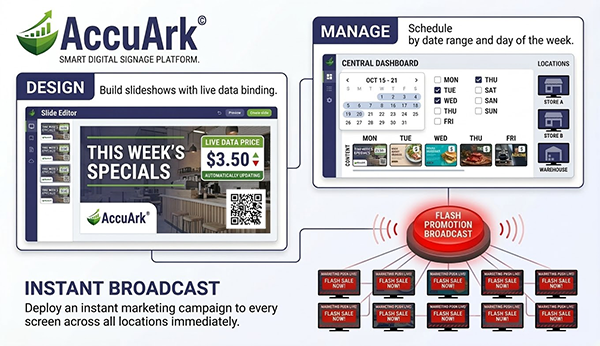
Slideshow Manager & Slide Editor
Build and organize slideshows from a central manager with four tabs: Dashboard for a quick overview and actions, Slides for managing individual slide content, Playlists for organizing slides into ordered sequences, and Schedules for controlling when playlists play. The slide editor supports live data binding so your displays always show current pricing, promotions, and store information without manual updates.
Slideshow Manager
Central hub with dashboard, slide management, playlists, and schedules in one interface
Slide Editor
Design slides with backgrounds, text, overlays, and live data binding with a real-time preview
Image & Video Slides
Create image, video, product, and custom slide types with configurable transition effects
Clone & Manage Slides
Duplicate slides, enable or disable them, set valid date ranges, and organize with tags
Background Options
Set solid color, gradient, image, video, or stream backgrounds with overlay opacity control
Text & Call to Action
Add headlines, subheadings, body text, and CTA buttons with custom fonts, colors, and positioning
Price Badge Overlay
Display original and sale prices with stock availability on a visual badge overlay
QR Code & Logo Overlays
Add QR codes with URLs and labels, and position your logo anywhere on the slide
Playlists & Schedule Automation
Organize slides into playlists and control exactly when they play. Set schedules by date range, time window, and day of the week. AccuArk© always has a default playlist ready when no schedule is active, so your screens never go dark.
Playlist Management
Create playlists, add slides, arrange order, and set loop behavior for continuous playback
Global Playlists
Mark playlists as global so they are available across all business locations at once
Default Playlist
Set a default playlist that plays automatically when no schedule is active
Schedule Automation
Assign playlists to date ranges, time windows, and specific days of the week
Slide Duration Control
Set how long each slide displays, with auto-advance for video slides when playback ends
Transition Effects
Choose from fade, slide, and zoom transitions with configurable speed between slides
Slideshow Player & Remote Controls
Launch a full-screen, always-on-top player on any connected display. The player automatically loads the active playlist based on your schedules or falls back to the default. A floating controls panel lets you pause, skip, refresh, or exit the player without touching the display screen.
Full-Screen Player
Borderless, always-on-top player renders content on any connected display automatically
Remote Player Controls
Floating control panel shows playlist name, slide counter, and status with pause, skip, and refresh
Emergency Override
Push urgent messages with custom colors and font size to this location or all locations instantly
Dashboard & Activity Log
Monitor player status, view slide and playlist counts, and track recent signage changes
Customer-Facing Display
Turn the secondary monitor at your register into a customer engagement tool. During transactions, customers see their items and totals in real time. Between sales, the display shows your welcome message, store branding, or a promotional slideshow to keep customers engaged while they wait.
Live Transaction View
Customers see scanned items, quantities, prices, subtotal, tax, discounts, and the grand total updating in real time as the cashier rings up the sale.
Idle-Time Promotions
When no sale is active, the display shows a rotating slideshow of promotional images or a custom welcome message. Keep customers engaged even while they wait in line.
Payment & Change Display
After payment, the display shows the amount paid and change due. Customers see exactly what they owe and what they receive back for full transparency at checkout.
Professional Slide Design Tools
The slide editor gives you full control over every element of your signage content. Design slides with a split-view editor that shows your configuration on the left and a live preview on the right, so you see exactly how your content will look on screen before you publish it.
Rich Background Options
Choose from solid colors, gradients, uploaded images, video files, or live video streams as your slide background. Adjust a dark overlay to improve text readability over busy images.
Text & Call-to-Action Elements
Add headlines, subheadings, body text, and call-to-action buttons with independent font, size, color, and style controls. Position text anywhere on the slide.
Overlays: Logo, Price & QR
Layer your company logo, a price badge showing original and sale prices, and QR codes with custom URLs and labels on top of any slide background.
Live Data Binding
Bind slides to live product data so names, prices, and availability update automatically from your inventory. Set fallback values for items not found.
Date-Range Validity
Set valid-from and valid-to dates on individual slides so seasonal or promotional content appears and disappears automatically without manual intervention.
Real-Time Preview
See exactly how your slide will look as you make changes. The live preview panel updates in real time so you can fine-tune your design before saving.
Emergency Override & Screen Control
When something urgent happens, take control of every screen immediately. The emergency override system lets you push critical messages to displays at one location or across all locations, with full control over appearance and automatic expiration.
Instant Override Activation
Push an urgent message to all screens with one click, replacing all scheduled content immediately
Scope Control
Target the override to the current location only or broadcast to every location at once
Custom Appearance
Set background color, text color, and font size for your emergency message with a live preview
Auto-Expiration
Set an expiration date and time so the override deactivates automatically and normal playback resumes
Deactivate All
Clear all active overrides across all locations with a single click to restore normal playback
Live Content Refresh
Update slides and playlists while the player runs, then click Refresh to load changes without restarting
What Sets AccuArk© Digital Signage Apart
These are the capabilities that make AccuArk© signage more than just a slideshow player — it is a complete in-store content management system integrated with your business data.
Live Data Binding
Your slides stay current without manual updates.
- Bind slide content to live product prices and promotions
- Store information updates automatically across all slides
- No need to edit slides when prices change
- Set fallback names and prices for items not found in inventory
Flexible Scheduling
Show the right content at the right time, automatically.
- Schedule playlists by date range and time windows
- Target specific days of the week for different content
- Default playlist plays when no schedule is active
- Set valid date ranges on individual slides for seasonal content
Emergency Override
When something urgent happens, take control instantly.
- Push a critical message to every screen with one click
- Override all active playlists and schedules immediately
- Customize message colors, font size, and scope per location
- Set auto-expiration or deactivate manually when the crisis passes
Customer-Facing Display
Turn your register's second screen into a customer engagement tool.
- Real-time transaction details visible to the customer
- Promotional slideshows play during idle time between sales
- Store name, welcome message, and custom branding on display
- Automatic change-due display after payment for transparency
Every Screen, One Dashboard
Most signage tools are separate systems that don't know your inventory. AccuArk© integrates digital signage directly into your business manager — live data binding keeps prices current, playlists schedule themselves, customer displays show real-time transactions, and emergency overrides reach every screen — all managed from one place.
Why Digital Signage Matters
Your in-store displays are prime real estate. Use them to inform, engage, and sell — without printing a single poster.
Engage Customers
Dynamic, eye-catching content captures attention and keeps customers informed about current promotions, new arrivals, and seasonal deals while they browse and wait.
Promote Products
Highlight featured items, sale pricing, and cross-sell opportunities right where customers are making buying decisions — at the shelf and register.
Professional Experience
Branded, scheduled content on every screen creates a polished, professional in-store experience that builds customer trust and loyalty.
Explore More Modules
AccuArk© modules work together seamlessly to run your entire business.
Choose Your Plan & Start Your Free Trial
Every plan includes all features. No feature walls, no hidden fees. Cancel anytime.
Perfect for solo entrepreneurs and single-register shops
- All Features Included
- Free Updates Forever
Three machines for your growing single-location business
- All Features Included
- Free Updates Forever
Two locations with 3 machines each — your first multi-site step
- All Features Included
- Free Updates Forever
Best value for growing chains — 20 locations
- All Features Included
- Free Updates Forever