Data Import & Export
Migrating to a new system shouldn't mean weeks of manual data entry. AccuArk© Data Exchange Center lets you import thousands of products, customers, vendors, and financial records from CSV or Excel files in minutes. The step-by-step wizard handles column mapping, validates every row before committing, and gives you a detailed summary when it's done. Need to pull data out? Export any dataset to Excel or PDF with a single click.
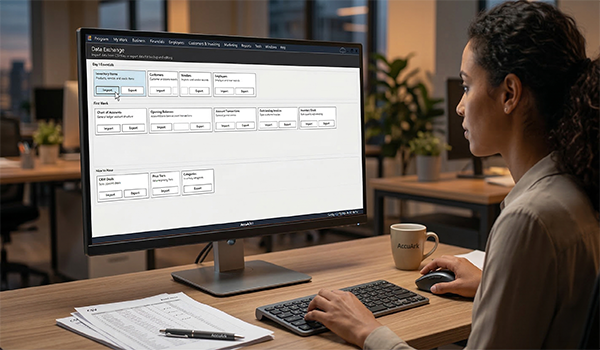
Bulk Data Import from Excel
The Data Exchange Wizard walks you through importing data step by step. Upload your Excel files (.xlsx, .xls) or CSV, map your columns, validate every row, and import in bulk. AccuArk© organizes data types into tiers so you always know where to start.
Import Products
Upload your entire product catalog from CSV or Excel with full field mapping
Import Customers
Bring in your customer list with contact details and account information
Import Vendors
Load your vendor and supplier records in bulk for faster onboarding
Import Employees
Import your staff roster with roles, departments, and contact info
Import Serial Numbers
Batch import serial numbers and link them to inventory items
Import Inventory Stock
Load current stock levels from a spreadsheet to set up your inventory
Import Financial Data
Import chart of accounts, opening balances, and bank transactions
Import Invoices & Bills
Bring in outstanding invoices and bills to keep your books current
The Data Exchange Wizard
Every import and export is guided by a five-step wizard that handles column mapping, data validation, progress tracking, and error reporting. You never have to guess what went wrong.
File Upload & Selection
Browse for your CSV or Excel file and tell the wizard if it has header rows
Column Mapping
Map each file column to the correct database field with a data preview
Dry Run Validation
Validate every row before committing with clear status indicators per record
Import Progress
Watch the progress bar and live log as each record is processed
Summary & Error Report
View total inserted, updated, skipped, and errored rows with export option
Location-Aware Imports
Select which location the imported data applies to for multi-store setups
Export & Data Exchange Center
The Data Exchange Center is your central hub for all data movement. Export any dataset to Excel or PDF, and manage all import and export activity from one organized interface with tiered data categories.
Data Exchange Center
Central hub organizing all data types into three priority tiers for import and export
Export to Excel
Download any report or dataset as .xlsx for analysis in external tools
Export to PDF
Generate print-ready PDF reports for sharing, archival, and compliance
What Sets AccuArk© Data Exchange Apart
These are the capabilities that make data migration and ongoing data management effortless and error-free.
Guided Wizard Experience
Never wonder what to do next during a data import.
- Five clear steps from file selection to completion
- Step indicator shows exactly where you are in the process
- Back and next navigation so you can review and adjust
- Cancel at any point without committing partial data
Validate Before You Commit
Catch errors before they reach your database.
- Dry run mode validates every row without importing
- Clear status indicators: valid, warning, or error per row
- Review issues and fix your source file before committing
- Export error reports for offline review and correction
Tiered Data Organization
Know exactly what to import first with a structured approach.
- Tier 1: Core data like products, customers, vendors, employees
- Tier 2: Financial data including accounts and transactions
- Tier 3: Operational data like invoices, bills, and stock levels
- Import in order for clean data dependencies
Smart Column Mapping
Your spreadsheet columns rarely match database fields exactly.
- Map each file column to the correct AccuArk© field
- Live data preview shows sample values during mapping
- Support for files with or without header rows
- Financial imports support target and debit/credit accounts
Your Data, Your Way
Most systems make you re-enter everything by hand. AccuArk© lets you import products, customers, vendors, employees, financial accounts, serial numbers, stock levels, invoices, and bills — all from the spreadsheets you already have. The five-step wizard validates every row before committing, so you migrate with confidence.
Why Data Import & Export Matters
Your data is the backbone of your business. Moving it quickly and accurately saves time, reduces errors, and keeps your operations running smoothly.
Migrate Easily
Switching from another system? Import your entire product catalog, customer list, and financial records in minutes instead of weeks of manual entry.
Backup Your Data
Export any dataset to Excel or PDF at any time. Keep offline copies of your records for compliance, auditing, or disaster recovery.
Integrate with Other Systems
Use CSV and Excel exports to feed data into accounting software, e-commerce platforms, or analytics tools that your business already relies on.
Explore More Modules
AccuArk© modules work together seamlessly to run your entire business.
Choose Your Plan & Start Your Free Trial
Every plan includes all features. No feature walls, no hidden fees. Cancel anytime.
Perfect for solo entrepreneurs and single-register shops
- All Features Included
- Free Updates Forever
Three machines for your growing single-location business
- All Features Included
- Free Updates Forever
Two locations with 3 machines each — your first multi-site step
- All Features Included
- Free Updates Forever
Best value for growing chains — 20 locations
- All Features Included
- Free Updates Forever