User Authentication & RBAC
Shared logins and vague permission policies create security gaps that cost businesses in fraud, data leaks, and compliance failures. AccuArk© gives you a full role-based access control system with custom roles, granular module-level permissions, and location-based role assignment. Every login, permission change, and sensitive action is recorded in a complete audit trail. Account lockout policies, password complexity rules, and single-use authorization codes protect your system from unauthorized access -- while keeping your team productive.
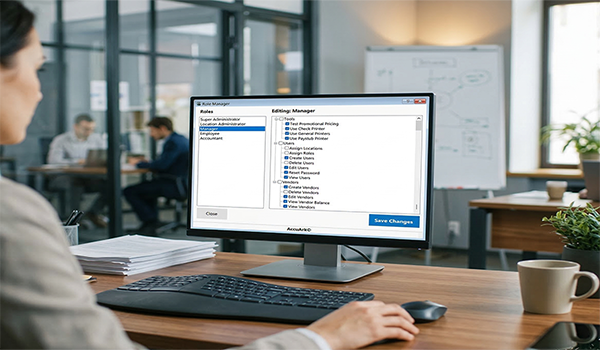
Role-Based Permissions
Define custom roles and assign granular permissions across every module. The role manager lets you control access to POS, invoicing, inventory, bills, accounting, CRM, and tools -- down to individual actions like voiding transactions or overriding prices.
Custom Role Creation
Create unlimited roles and define their permissions using a visual tree view
Location-Based Assignment
Assign different roles to the same user at different business locations
POS & Invoicing Permissions
Control who can sell, void, apply discounts, issue refunds, and override prices
Inventory & Bills Permissions
Restrict access to stock adjustments, purchase orders, receiving, and bill payments
Accounting Permissions
Limit access to chart of accounts, journal entries, period management, and financial reports
CRM & Customer Permissions
Control access to customer records, deals, activities, campaigns, and loyalty programs
Tools & Printing Permissions
Manage access to label printing, barcode tools, reporting, and system utilities
Protected Super Admin
Super Admin role cannot be modified or removed, ensuring permanent system access
Audit Logging & Security Policies
Every login, permission change, and sensitive action is recorded with user, timestamp, and details. Configure account lockout policies and password complexity rules to defend against unauthorized access, and review detailed audit trails whenever you need them.
Login Audit Log
Track every login attempt with timestamps, IP addresses, and success or failure status
User Session Tracking
Monitor active sessions, session history, and which machines each user is logged into
Permission Change Log
Full history of role and permission modifications with before and after details
Sensitive Action Audit
Log voids, refunds, price overrides, and other restricted operations with user attribution
Account Lockout Policies
Configure max failed login attempts and lockout duration to block brute-force access
Password Complexity Rules
Enforce minimum length, uppercase, lowercase, numbers, and special characters
Authorization Codes & Elevated Permissions
Sometimes employees need temporary permission to perform a restricted action without a manager present. Authorization codes give you a secure, auditable way to grant one-time access without changing role assignments or weakening your security policies.
Single-Use Authorization Codes
Managers generate a code for a specific permission at a specific location. The employee enters the code to perform the restricted action once. Each code expires after a configurable time and can only be used once.
Active Codes Management
View all active, used, expired, and revoked codes in a centralized list. Revoke any active code instantly if it is no longer needed, with full tracking of who generated each code and when.
Audited & Time-Limited
Every code usage is logged with the generating manager, employee, permission granted, location, and exact time. Codes expire automatically after the configured duration, ensuring temporary access stays temporary.
Encryption, Backups & System Tools
Protect your data at rest and in transit, maintain automatic backups, and keep your system healthy with built-in diagnostics. AccuArk© includes the infrastructure-level security features your business data demands.
Data Encryption
Sensitive business data is encrypted to protect against unauthorized access and data breaches.
Automatic Backups
Scheduled automatic backups keep your data safe. Restore from any backup point if something goes wrong.
Offline Access Codes
Generate offline access codes so your team can continue operating even when the network is unavailable.
System Diagnostics
View application version, database status, machine identity, and OS details. Share diagnostics with support for fast troubleshooting.
Subscription & License Management
Manage your AccuArk© subscription, license keys, and user seats from one centralized admin panel.
User Preferences
Each user can configure their own display preferences, default views, and notification settings.
What Sets AccuArk© Security Apart
These are the capabilities that make AccuArk© more than basic user management -- features that protect your business, empower your team, and keep you audit-ready.
Location-Based Role Assignment
One user, different roles at different locations.
- Assign a user as Manager at one location and Cashier at another
- Summary grid shows all role assignments across all locations
- Super Admin role assignment cannot be removed from the initial admin
- Roles are evaluated per-location at login and during permission checks
Granular Permission Tree
Control access down to individual actions within each module.
- Visual tree view organizes permissions by category
- Check or uncheck individual permissions for each role
- Covers POS, invoicing, inventory, bills, accounting, CRM, and tools
- Changes take effect immediately across all locations
Account Lockout & Password Policy
Defend against unauthorized access with configurable security policies.
- Set max failed login attempts before automatic lockout
- Configure lockout duration in minutes with auto-unlock
- Enforce minimum password length and character requirements
- Require uppercase, lowercase, numbers, and special characters
Single-Use Authorization Codes
Grant temporary elevated permissions without changing roles.
- Managers generate codes for specific permissions and locations
- Codes expire after a configurable time in minutes
- Each code can only be used once and is logged to the audit trail
- Revoke active codes instantly from the management screen
Security Built Into Every Module
Most POS and business systems treat security as an afterthought. AccuArk© embeds it into every action -- granular role-based permissions, per-location role assignments, single-use authorization codes, account lockout policies, and complete audit logging -- so your data stays protected and every action is traceable. One security framework across your entire business.
Why Security & Access Control Matters
Your business data is only as safe as the access controls protecting it. Proper role management directly impacts fraud prevention, compliance, and operational efficiency.
Prevent Unauthorized Access
Account lockout policies, password complexity enforcement, and granular permissions ensure only authorized users can access sensitive functions. Every failed login attempt is tracked.
Audit-Ready Accountability
Complete audit trails for logins, permission changes, voids, refunds, and overrides give you full traceability. Know exactly who did what, when, and where.
Empower Your Team
Location-based roles and authorization codes let you give employees exactly the access they need without over-permissioning. Flexibility without risk.
Explore More Modules
AccuArk© modules work together seamlessly to run your entire business.
Choose Your Plan & Start Your Free Trial
Every plan includes all features. No feature walls, no hidden fees. Cancel anytime.
Perfect for solo entrepreneurs and single-register shops
- All Features Included
- Free Updates Forever
Three machines for your growing single-location business
- All Features Included
- Free Updates Forever
Two locations with 3 machines each — your first multi-site step
- All Features Included
- Free Updates Forever
Best value for growing chains — 20 locations
- All Features Included
- Free Updates Forever