Complex Invoicing System
Not every sale happens at the register. Service businesses, contractors, and delivery operations need invoicing that goes far beyond a simple line-item list. AccuArk© handles the full lifecycle of sophisticated billing scenarios -- from initial quote through team assignment, delivery scheduling, customer approval, and final payment. Manage payment plans, collect deposits before work begins, track fulfillment across locations, and generate work orders for field teams -- all tied directly to the invoice. Whether you are scheduling installations, coordinating deliveries, or running recurring billing, AccuArk© gives you one system to manage it all.
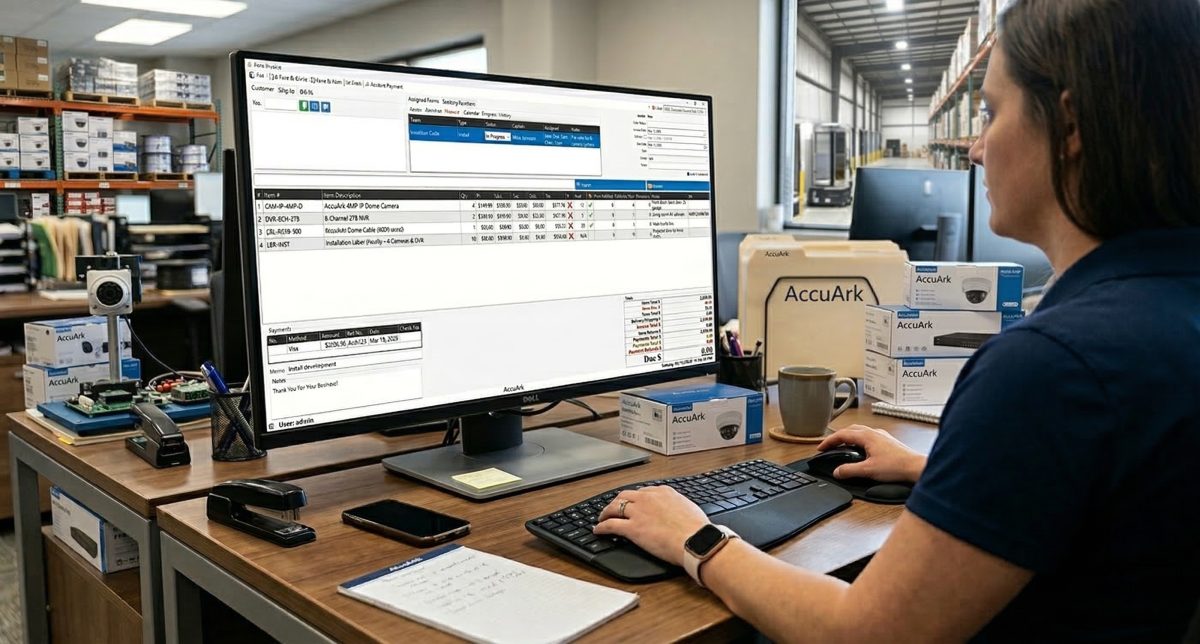
Invoice Creation & Editing
Create professional invoices with line items, products, services, and custom notes. Add shipping and billing addresses, assign technicians, set payment terms, and manage the full invoice from a single workspace. Convert quotes to invoices with one click and create recurring templates for regular billing.
Line Items with Products & Services
Add products and services by search, barcode scan, or catalog browse with quantity, price, and discount columns
Line Item Notes
Add detailed notes to individual line items that can optionally be printed on the customer invoice
Quotes & Estimates
Create estimates with line items, taxes, and discounts, then convert accepted quotes directly into invoices
Recurring Invoice Templates
Create templates that auto-generate invoices on a weekly, monthly, or quarterly schedule for regular customers
Email & PDF Export
Email invoices and packing slips directly to customers, or save as PDF for your records
Printing & Work Orders
Print invoices, packing slips, and work orders formatted for internal staff with task-oriented details
Credit Limit Enforcement
Enforce customer credit limits to prevent orders from exceeding approved credit thresholds
Multi-Location Fulfillment
Fulfill orders from any location, request stock transfers, and track fulfillment across branches
Status Workflow & Payments
Every invoice flows through configurable statuses -- from quote to delivery confirmation -- with automatic inventory actions at each stage. Status changes can reserve stock, subtract inventory, lock the invoice from editing, and trigger color-coded highlights on list screens for instant visual identification.
Configurable Order Statuses
Define custom statuses like Open, In Progress, Completed, and Cancelled with per-status rules
Status-Driven Inventory
Each status triggers None, Reserve, or Subtract inventory actions automatically when applied
Edit Lock by Status
Lock invoices from editing when they reach certain statuses to protect finalized orders
Payment Recording & Refunds
Record payments by cash, card, check, or bank transfer and process refunds with full tracking
Deposit Collection & Gating
Require deposits before advancing order stages and track deposit amounts against invoice totals
Payment Scheduling
Set up payment plans and installment schedules so customers can pay over time
Customer Approval & Delivery Confirmation
Get customer sign-off before proceeding with work, then confirm delivery to automatically advance the invoice status. Track shipping with carrier tracking numbers and manage separate shipping and billing addresses for every order.
Customer Approval Workflow
Request customer approval with a signature screen before proceeding with production, installation, or delivery. The approval is recorded with timestamp and stored on the invoice for your records.
Delivery Confirmation
Record that items have been delivered, installed, or serviced. Delivery confirmation auto-advances the invoice status and updates fulfillment quantities for each line item.
Shipping & Billing Addresses
Manage separate Ship To and Bill To addresses on every invoice. Search from saved customer addresses, create new ones, or copy the mailing address with one click.
Shipping Tracking Numbers
Record carrier tracking numbers for shipped items. Tracking numbers can be printed on the invoice and emailed to the customer for real-time shipment visibility.
Fulfillment Tracking
Track previously fulfilled, currently fulfilling, and remaining quantities for each line item. A fulfilled checkbox marks items that have been completely delivered.
Invoice Status History
View the complete audit trail of every status change, payment, and action on each invoice with user, timestamp, and details for full traceability.
Teams, Scheduling & Work Orders
Assign teams to jobs, schedule work on a shared calendar, track progress with percentage-based logging, and generate printable work orders -- all tied directly to the invoice. Each team has a captain, members, type, and location assignment for organized field operations.
Team Assignment
Assign installation, delivery, or service teams directly to invoices. Each team has a captain, members, type, and location. Multiple teams can be assigned to a single invoice for different tasks.
Scheduling & Calendar
Schedule work with a shared team calendar showing dates, times, and assigned teams. Coordinate deliveries, installations, and service appointments across your workforce.
Work Orders
Generate comprehensive work orders from invoices that include customer info, line items, job site address, schedule, and progress log. Print and distribute to field teams.
Job Progress Tracking
Log progress entries with completion percentage, description, and type. Team captains update progress directly from the work order, and the full history is recorded for review.
Purchase Orders from Invoice
Create purchase orders directly from invoice line items to fulfill customer orders. Source products from vendors without leaving the invoice screen.
Invoice Grouping
Organize invoices into groups by project, department, or category. Filter the sales transactions view by group to quickly find related orders.
What Sets AccuArk© Invoicing Apart
These are the capabilities that make AccuArk© Complex Invoicing more than a billing tool -- features that manage the full order-to-delivery lifecycle in one system.
Configurable Status Workflow
Define the exact stages your invoices move through, with automatic actions at each step.
- Create custom statuses like Open, In Progress, Ready, and Completed
- Each status can reserve or subtract inventory automatically
- Lock invoices from editing at specific workflow stages
- Color-code statuses for instant visual identification on list screens
Work Orders & Field Operations
Everything your field teams need to complete the job, generated from the invoice.
- Work orders include customer info, line items, job site, and schedule
- Team captains log progress with completion percentages
- Mark work orders complete when all tasks are finished
- Full progress history with entries by person, date, and type
Quote-to-Invoice Pipeline
Move seamlessly from estimate to invoice without re-entering data.
- Create estimates with full line items, taxes, and discounts
- Set follow-up dates to track pending quotes on the Estimates Dashboard
- Convert accepted estimates to invoices with one click
- Estimate is marked as converted and linked to the new invoice
Recurring Invoice Automation
Automate regular billing with templates that generate invoices on schedule.
- Create templates with customer, items, terms, and frequency
- Auto-generate invoices weekly, monthly, or quarterly
- Activate, deactivate, or manually generate from any template
- View generation history with dates and invoice numbers
One Invoice, Complete Visibility
Most invoicing tools stop at line items and totals. AccuArk© connects your quotes, payments, team assignments, work orders, delivery scheduling, and fulfillment tracking to every invoice -- so your entire team works from one source of truth, from the first quote to the final delivery confirmation.
Why Complex Invoicing Matters
Businesses that deliver, install, or service need more than a billing system. Integrated invoicing connects your sales, operations, and finance teams.
End-to-End Traceability
Every quote, status change, payment, team assignment, and delivery is linked to the invoice. You never lose track of where an order stands or what happened along the way.
Operational Efficiency
Teams get work orders, schedules, and job details directly from the invoice. No separate systems, no manual handoffs, no missed details between sales and operations.
Cash Flow Protection
Deposit gating, credit limit enforcement, and payment scheduling ensure you collect revenue before committing resources. Payment plans let customers pay on terms that work for both sides.
Explore More Modules
AccuArk© modules work together seamlessly to run your entire business.
Choose Your Plan & Start Your Free Trial
Every plan includes all features. No feature walls, no hidden fees. Cancel anytime.
Perfect for solo entrepreneurs and single-register shops
- All Features Included
- Free Updates Forever
Three machines for your growing single-location business
- All Features Included
- Free Updates Forever
Two locations with 3 machines each — your first multi-site step
- All Features Included
- Free Updates Forever
Best value for growing chains — 20 locations
- All Features Included
- Free Updates Forever